
border radius
The border radius property converts the rectangular sharp corners of a box into rounded shape corners. The value of border radius may in some unit (px, em) or in percentage (%).
<style>
.exampleBlock{
 width:100px;
 height:100px;
 background-color:lightblue;
 margin-left:10px;
 margin-top:10px;
}
.changeBorderWidth{
 width:100px;
 height:100px;
 background-color:lightblue;
 border:2px solid red;
}
img{
border:0px;
}
</style>
<div style="width:100%; height:auto; float:left; font-size:14px;">
 <div style="width:200px; float:left;" ><div class="exampleBlock" style="border-radius:100%;"></div><br>border-radius:50%;</div>
 <div style="width:200px; float:left;" ><div class="exampleBlock" style="border-top-left-radius:100%;"></div><br>border-top-left-radius:100%;</div>
 <div style="width:200px; float:left;" ><div class="exampleBlock" style="border-radius:20px / 40px;"></div><br>border-radius:20px / 40px;</div>
 <div style="width:200px; float:left;" ><div class="exampleBlock" style="border-radius:40px / 20px;"></div><br>border-radius:40px / 20px;</div>
</div>
<br>

<script>
 function changeBorderUpdate(){
	 setInterval(changeBorder,1);
 }
 getValueForRadius = document.getElementsByClassName("changeBorderWidth")[0];
 getValueForValue1 = document.getElementById("changingValueOfBorderWidth1");
 getValueForValue2 = document.getElementById("changingValueOfBorderWidth2");
 getValueForValue3 = document.getElementById("changingValueOfBorderWidth3");
 getValueForValue4 = document.getElementById("changingValueOfBorderWidth4");
 function changeBorder(){
 getValueForRadius.style.borderTopLeftRadius = document.getElementById("borderWidthMeter1").value+"%";
 getValueForRadius.style.borderTopRightRadius = document.getElementById("borderWidthMeter2").value+"%";
 getValueForRadius.style.borderBottomRightRadius = document.getElementById("borderWidthMeter3").value+"%";
 getValueForRadius.style.borderBottomLeftRadius = document.getElementById("borderWidthMeter4").value+"%";
 getValueForValue1.innerHTML = document.getElementById("borderWidthMeter1").value+"%";
 getValueForValue2.innerHTML = document.getElementById("borderWidthMeter2").value+"%";
 getValueForValue3.innerHTML = document.getElementById("borderWidthMeter3").value+"%";
 getValueForValue4.innerHTML = document.getElementById("borderWidthMeter4").value+"%";
 }
</script>
There are different perspectives of the border-radius property.
value in some unit (px)
We'll take the value in pixels.
One value for border-radius property
When we specify a value for the radius property, it is applied to all the four corners of box.
<style>
div{
 width:100px;
 height:100px;
 border-radius:50px;
}
</style>
If the value of border-radius property is half (50px) of the dimension of the box, then a circular shape is formed.
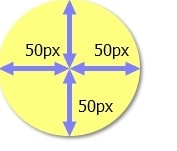
It means that the value of border-top-left, border-top-right, border-bottom-right-radius, border-bottom-left-radius is 50px.
Values for individual properties
It'll be more clear when we define different properties for the four corners.
<style>
div{
 width:100px;
 height:100px;
 border-top-left-radius:10px 50px;
 border-top-right-radius:20px 50px;
 border-bottom-right-radius:25px 40px;
 border-bottom-left-radius:5px 30px;
}
</style>
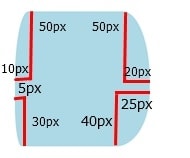
The above individual properties can be combined into one property. The following example forms the same shape as the example given above.
<style>
div{
 width:100px;
 height:100px;
 border-radius:10px 20px 25px 5px / 50px 50px 40px 30px;
}
</style>
value in percentage (%)
In this case, we'll take the value in percentage (%).
One value for border-radius property (%)
<style>
div{
 width:100px;
 height:100px;
 border-radius:50%;
}
</style>
values for individual properties (%)
We can also define border-radius properties for the individual corners.
<style>
div{
 width:100px;
 height:100px;
 border-top-left-radius:100%;
 border-top-right-radius:100%;
 border-bottom-right-radius:100%;
}
</style>
Practice border-radius property
See how border-radius property transforms the corners into rounded shape.
<style>
.exampleBlock{
 width:100px;
 height:100px;
 background-color:lightblue;
 margin-left:10px;
 margin-top:10px;
}
.changeBorderWidth{
 width:100px;
 height:100px;
 background-color:lightblue;
 border:2px solid red;
}
img{
border:0px;
}
</style>
<div class="changeBorderWidth"></div>
<p>width:100px;</p>
<p>height:100px;</p>
<p>border-top-left-radius:<span id="changingValueOfBorderWidth1">0%</span>; <input type="range" min="0" max="100" id="borderWidthMeter1" value="0" onchange="changeBorderUpdate();"></p>
<p>border-top-right-radius:<span id="changingValueOfBorderWidth2">0%</span>; <input type="range" min="0" max="100" id="borderWidthMeter2" value="0" onchange="changeBorderUpdate();"></p>
<p>border-bottom-right-radius:<span id="changingValueOfBorderWidth3">0%</span>; <input type="range" min="0" max="100" id="borderWidthMeter3" value="0" onchange="changeBorderUpdate();"></p>
<p>border-bottom-left-radius:<span id="changingValueOfBorderWidth4">0%</span>; <input type="range" min="0" max="100" id="borderWidthMeter4" value="0" onchange="changeBorderUpdate();"></p>

<script>
 function changeBorderUpdate(){
	 setInterval(changeBorder,1);
 }
 getValueForRadius = document.getElementsByClassName("changeBorderWidth")[0];
 getValueForValue1 = document.getElementById("changingValueOfBorderWidth1");
 getValueForValue2 = document.getElementById("changingValueOfBorderWidth2");
 getValueForValue3 = document.getElementById("changingValueOfBorderWidth3");
 getValueForValue4 = document.getElementById("changingValueOfBorderWidth4");
 function changeBorder(){
 getValueForRadius.style.borderTopLeftRadius = document.getElementById("borderWidthMeter1").value+"%";
 getValueForRadius.style.borderTopRightRadius = document.getElementById("borderWidthMeter2").value+"%";
 getValueForRadius.style.borderBottomRightRadius = document.getElementById("borderWidthMeter3").value+"%";
 getValueForRadius.style.borderBottomLeftRadius = document.getElementById("borderWidthMeter4").value+"%";
 getValueForValue1.innerHTML = document.getElementById("borderWidthMeter1").value+"%";
 getValueForValue2.innerHTML = document.getElementById("borderWidthMeter2").value+"%";
 getValueForValue3.innerHTML = document.getElementById("borderWidthMeter3").value+"%";
 getValueForValue4.innerHTML = document.getElementById("borderWidthMeter4").value+"%";
 }
</script>
The width and height of the box is 100px.
You may use border radius generator to round the corners of a rectangular shape.
Learn how to make an isosceles triangle or right triangle using border radius property.